FXT Pipeline: fxtchain
fxtchain reduces an FXT observation in Full Frame (FF), Partial Window (PW), or Timing (TM) mode. The default run (stage 1) produces cleaned Level 2 events and good-time intervals. Use exitstage=2 to extract science products as well (Figure 1).
XSELECT limits path lengths. Use short paths for the output and working directories and for the writable user directory in PFILES.
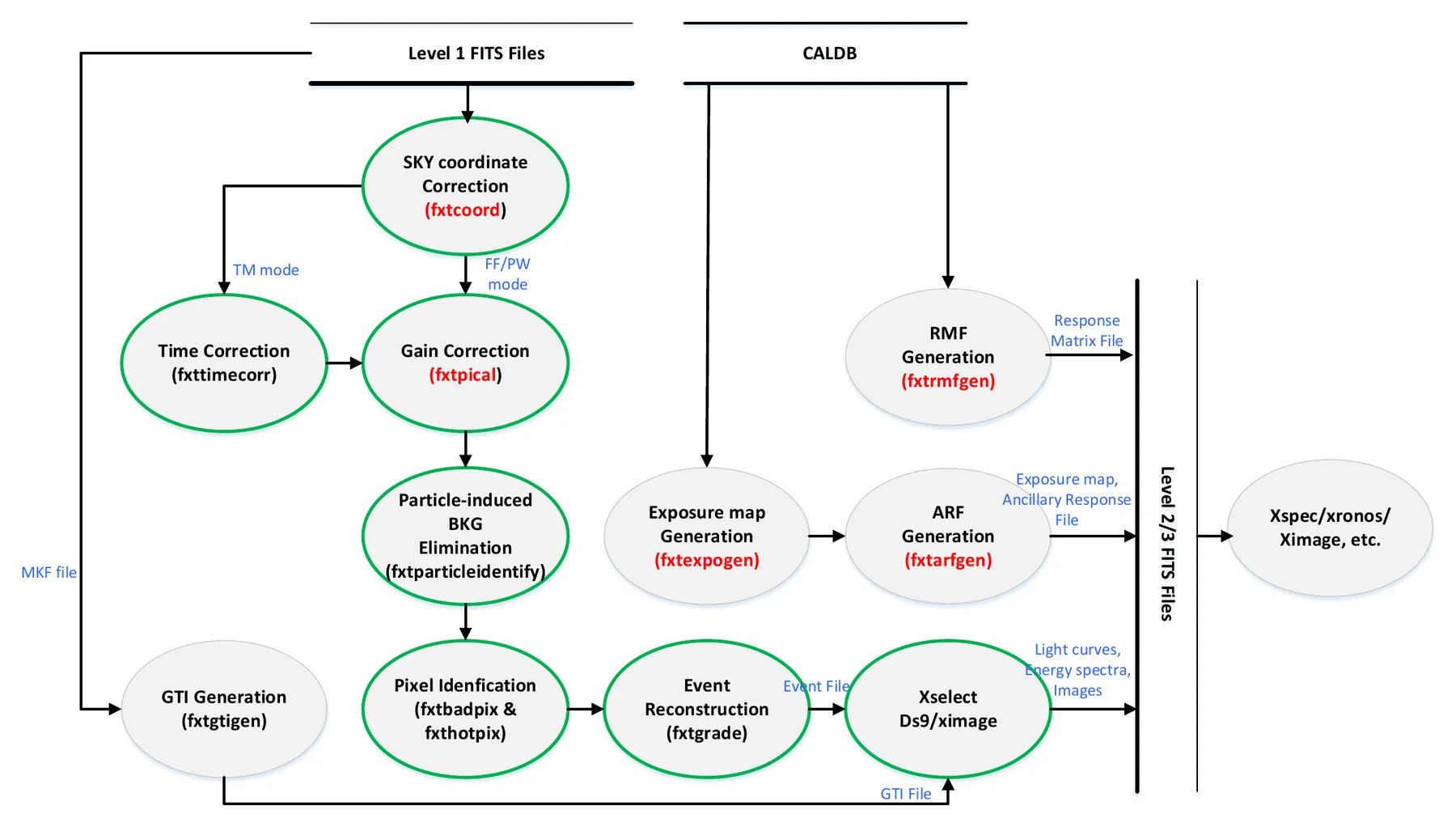
fxtchain.Input layout and processing stages
Set indir to the observation directory containing the following subdirectories:
fxt/event: the EVT or FSAEVT files to process;fxt/hk: the matching MKF file;auxil: the matching ATT and ORB files.
Supply at least one event file and the matching housekeeping, attitude, and orbit files. Set outdir to a writable output path.
- Coordinates, event times, and energy.
fxtcoorduses the spacecraft attitude and telescope definition to calculate detector, focal-plane, and sky coordinates. For TM and DT data,fxttimecorrreconstructs arrival times and detector rows using the supplied target coordinates. If the pair is omitted, the pipeline uses the event-header target position (RA_OBJ,DEC_OBJ) or the pointing position (RA_PNT,DEC_PNT).fxtpicalapplies the gain and charge-transfer corrections and assigns PI channels. - Event screening.
fxtparticleidentifyflags particle tracks.fxtbadpixandfxthotpixflag bad and hot pixels, andfxtgradeassigns event grades. Setuserbpfileto include additional known bad pixels. - Good-time intervals.
fxtgtigenevaluates the selectedexpragainst the MKF file.usergtifilecan add a user GTI. XSELECT then applies the grade filter, the generated GTI, and the event-status selection before saving the cleaned event file. - Stage 1 output.
exitstage=1stops after the cleaned event products. If a mode-matched source or background region is supplied, XSELECT also writes the corresponding filtered event file.
Running the calibration tasks individually
The following shell example prepares the graded events and GTI used in the XSELECT examples below. Set the observation directory and filenames to match your data. Use a separate output directory for each module and mode. For TM data, set RA and DEC to the target coordinates in degrees.
obs=./observation
out=./fxt-products
obsid=10216766310
mod=a
mode=ff
ver=1aa
stem="fxt_${mod}_${obsid}_${mode}_00_po"
raw="$obs/fxt/event/${stem}_uf_evt_${ver}.fits"
att="$obs/auxil/ep_${obsid}_att_${ver}.fits"
mkf="$obs/fxt/hk/fxt_${obsid}_mkf_${ver}.fits"
mkdir -p "$out"

fxtcoord evtfile="$raw" attfile="$att" outfile="$out/coord.fits"
pi_input="$out/coord.fits"
length=11
if [ "$mode" = tm ]; then
    fxttimecorr evtfile="$out/coord.fits" attfile="$att" \
        ra="${RA:?Set the target RA in degrees}" \
        dec="${DEC:?Set the target Dec in degrees}" \
        outfile="$out/timecorr.fits"
    pi_input="$out/timecorr.fits"
    length=35
fi
fxtpical evtfile="$pi_input" outfile="$out/pi.fits"
fxtparticleidentify evtfile="$out/pi.fits" outfile="$out/particle.fits" \
    xlength="$length" ylength="$length"
fxtbadpix evtfile="$out/particle.fits" outfile="$out/badpix.fits"
fxthotpix evtfile="$out/badpix.fits" outfile="$out/hotpix.fits"
fxtgrade evtfile="$out/hotpix.fits" pithresh=0 \
    outfile="$out/${stem}_evt_grade_${ver}.fits"
fxtgtigen mkffile="$mkf" module="fxt${mod}" expr=DEFAULT \
    outfile="$out/${stem}_gti_${ver}.fits"
The particle-track length criteria are 11 pixels in FF/PW and 35 pixels in TM. Use userbpfile with fxtbadpix for additional bad pixels, or usergtifile with fxtgtigen for a user-supplied GTI.
Stage-2 products
For ordinary EVT data, stage 2 extracts a full-field spectrum over the full PI range. The full-field light curve and image use PI channels 38–925. Source and background regions have their own spectra and light curves, both extracted over the full PI range.
fxtexpogen builds the exposure map from the cleaned events and MKF file. fxtarfgen uses the spectrum and exposure map to generate an ARF, and fxtrmfgen generates the matching RMF. Stage 2 also produces diagnostic plots and computes a power spectrum from the events in PI channels 38–925. Table 2 lists the timing parameters for each mode.
For frame-store area events (datatype=fsaevt), the standard stage-2 products are cleaned FSA events and a full-field spectrum for particle-background analysis. The full-field FSA spectrum retains the screened PI and detector-coordinate ranges.
Choose one of the four XSELECT scripts below for the FF example, according to the products and regions you need. Save the script in ./fxt-products alongside the graded event and GTI files. Run the accompanying shell command from the parent directory. For regional products, put the DS9 region files in ./fxt-products/regions/.
Stage 1 without regions
Save as stage1-ff.xsl and run from the parent directory:
cd ./fxt-products
xselect @stage1-ff.xsl
EP
set datadir .
read events fxt_a_10216766310_ff_00_po_evt_grade_1aa.fits
yes
set binsize 1.0
filter grade 0-12
filter time file fxt_a_10216766310_ff_00_po_gti_1aa.fits
select event "status==b0"
extract events copyall=yes
save events fxt_a_10216766310_ff_00_po_cl_1aa.fits clobberit=yes
no
clear all proceed=yes
quit
noStage 2 without regions
Save as stage2-ff.xsl and run from the parent directory:
cd ./fxt-products
xselect @stage2-ff.xsl
EP
set datadir .
read events fxt_a_10216766310_ff_00_po_evt_grade_1aa.fits
yes
set binsize 1.0
filter grade 0-12
filter time file fxt_a_10216766310_ff_00_po_gti_1aa.fits
select event "status==b0"
extract events copyall=yes
save events fxt_a_10216766310_ff_00_po_cl_1aa.fits clobberit=yes
no
extract spectrum copyall=yes
save spectrum fxt_a_10216766310_ff_00_po_1aa.pha clobberit=yes
filter pha_cutoff 38 925
extract events copyall=yes
save events fxt_a_10216766310_ff_00_po_cl_tmp_1aa.fits clobberit=yes
no
extract curve copyall=yes
save curve fxt_a_10216766310_ff_00_po_1aa.lc clobberit=yes
extract image xysize=601 xybinsize=1 xcenter=300 ycenter=300 copyall=yes
save image fxt_a_10216766310_ff_00_po_1aa.img clobberit=yes
clear pha_cutoff
clear events
clear all proceed=yes
quit
noStage 1 with source and background regions
The example assumes regions/source_ff.reg and regions/background_ff.reg are below the data directory selected by set datadir.
Save as stage1-ff-regions.xsl and run from the parent directory:
cd ./fxt-products
xselect @stage1-ff-regions.xsl
EP
set datadir .
read events fxt_a_10216766310_ff_00_po_evt_grade_1aa.fits
yes
set binsize 1.0
filter grade 0-12
filter time file fxt_a_10216766310_ff_00_po_gti_1aa.fits
select event "status==b0"
extract events copyall=yes
save events fxt_a_10216766310_ff_00_po_cl_1aa.fits clobberit=yes
no
filter region regions/source_ff.reg
extract events copyall=yes
save events fxt_a_10216766310_ff_00_po_cl_src_1aa.fits clobberit=yes
no
clear region
clear events
filter region regions/background_ff.reg
extract events copyall=yes
save events fxt_a_10216766310_ff_00_po_cl_bkg_1aa.fits clobberit=yes
no
clear region
clear events
clear all proceed=yes
quit
noStage 2 with source and background regions
Save as stage2-ff-regions.xsl and run from the parent directory:
cd ./fxt-products
xselect @stage2-ff-regions.xsl
EP
set datadir .
read events fxt_a_10216766310_ff_00_po_evt_grade_1aa.fits
yes
set binsize 1.0
filter grade 0-12
filter time file fxt_a_10216766310_ff_00_po_gti_1aa.fits
select event "status==b0"
extract events copyall=yes
save events fxt_a_10216766310_ff_00_po_cl_1aa.fits clobberit=yes
no
filter region regions/source_ff.reg
extract events copyall=yes
save events fxt_a_10216766310_ff_00_po_cl_src_1aa.fits clobberit=yes
no
clear region
clear events
filter region regions/background_ff.reg
extract events copyall=yes
save events fxt_a_10216766310_ff_00_po_cl_bkg_1aa.fits clobberit=yes
no
clear region
clear events
extract spectrum copyall=yes
save spectrum fxt_a_10216766310_ff_00_po_1aa.pha clobberit=yes
filter pha_cutoff 38 925
extract events copyall=yes
save events fxt_a_10216766310_ff_00_po_cl_tmp_1aa.fits clobberit=yes
no
extract curve copyall=yes
save curve fxt_a_10216766310_ff_00_po_1aa.lc clobberit=yes
extract image xysize=601 xybinsize=1 xcenter=300 ycenter=300 copyall=yes
save image fxt_a_10216766310_ff_00_po_1aa.img clobberit=yes
clear pha_cutoff
clear events
filter region regions/source_ff.reg
extract all copyall=yes
save spectrum fxt_a_10216766310_ff_00_po_src_1aa.pha clobberit=yes
save curve fxt_a_10216766310_ff_00_po_src_1aa.lc clobberit=yes
clear region
clear events
filter region regions/background_ff.reg
extract all copyall=yes
save spectrum fxt_a_10216766310_ff_00_po_bkg_1aa.pha clobberit=yes
save curve fxt_a_10216766310_ff_00_po_bkg_1aa.lc clobberit=yes
clear all proceed=yes
quit
noThe same branch structure is used for PW and TM with their corresponding region parameters. For FSAEVT, insert filter column "DETX=3:382 DETY=3:382" immediately after filter pha_cutoff 38 925; the full-field spectrum is saved before that filter, and the ordinary response and power-spectrum tasks are not run.
Modes, regions, and power spectra
Select the DS9 region parameters for the observing mode (Table 1).
| Mode | source region | background region |
|---|---|---|
| FF | srcffregion | bkgffregion |
| PW | srcpwregion | bkgpwregion |
| TM | srctmregion | bkgtmregion |
For ordinary EVT data, stage 1 saves an event file for each supplied region. Stage 2 also extracts the regional spectra and light curves and generates responses for the regional spectra.
| Parameter | FF | PW | TM |
|---|---|---|---|
dtnb (s) | 0.05 | 0.0022 | 0.00048828125 |
nbint (bins per interval) | 2048 | 32768 | 131072 |
Parameters
The parameters of this tool are listed below. In batch mode, supply the required indir, outdir, exitstage, and expr values explicitly.
- indir [string]
Observation directory containing thefxt/event,fxt/hk, andauxilsubdirectories. The directory must contain the files required by the selected event type. If omitted,fxtchainprompts for it.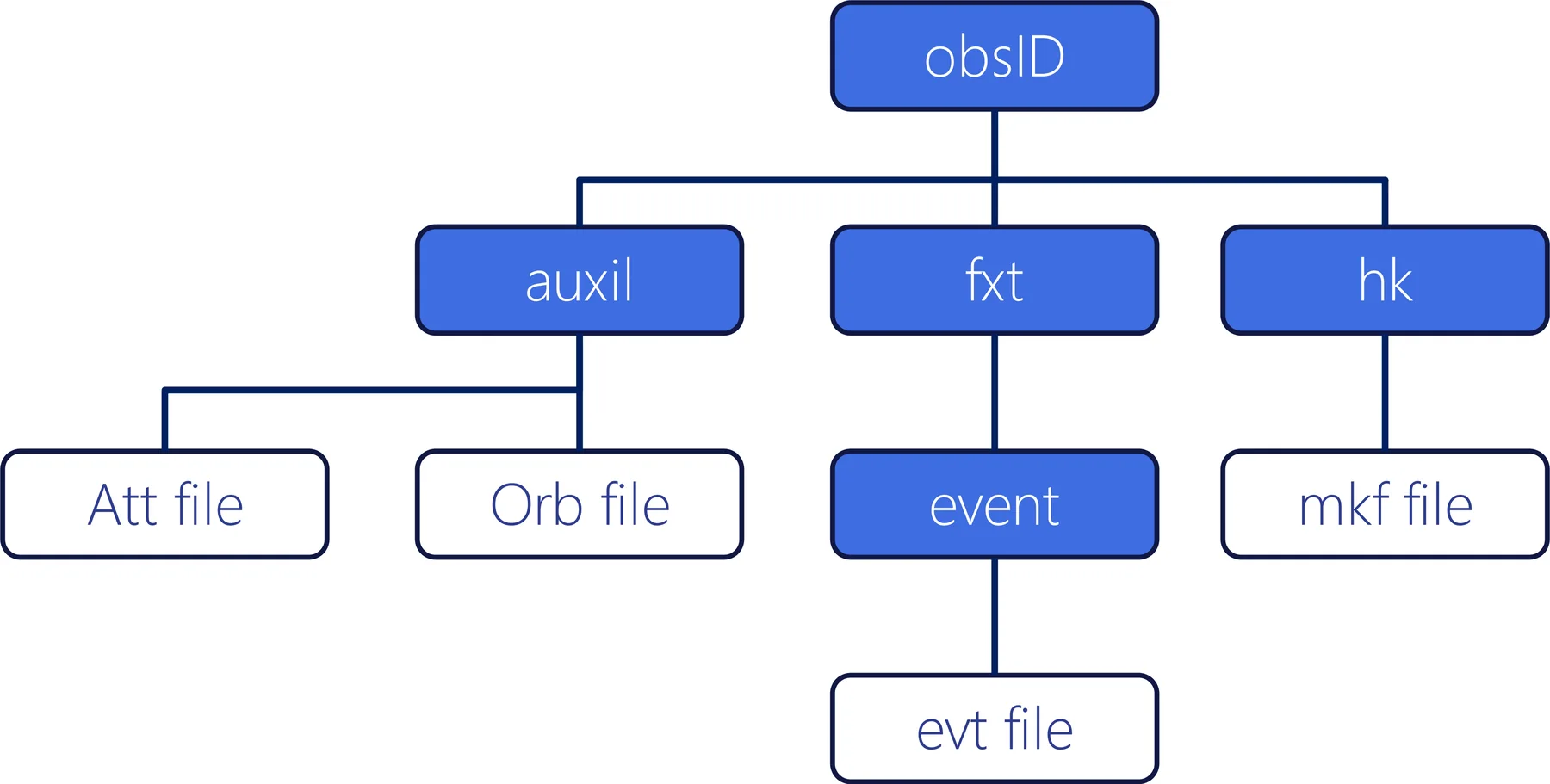
Figure 2: Input directory hierarchy. - outdir [string]
Writable directory for the reduced events, GTIs, spectra, images, light curves, responses, and plots. It is created if it does not exist.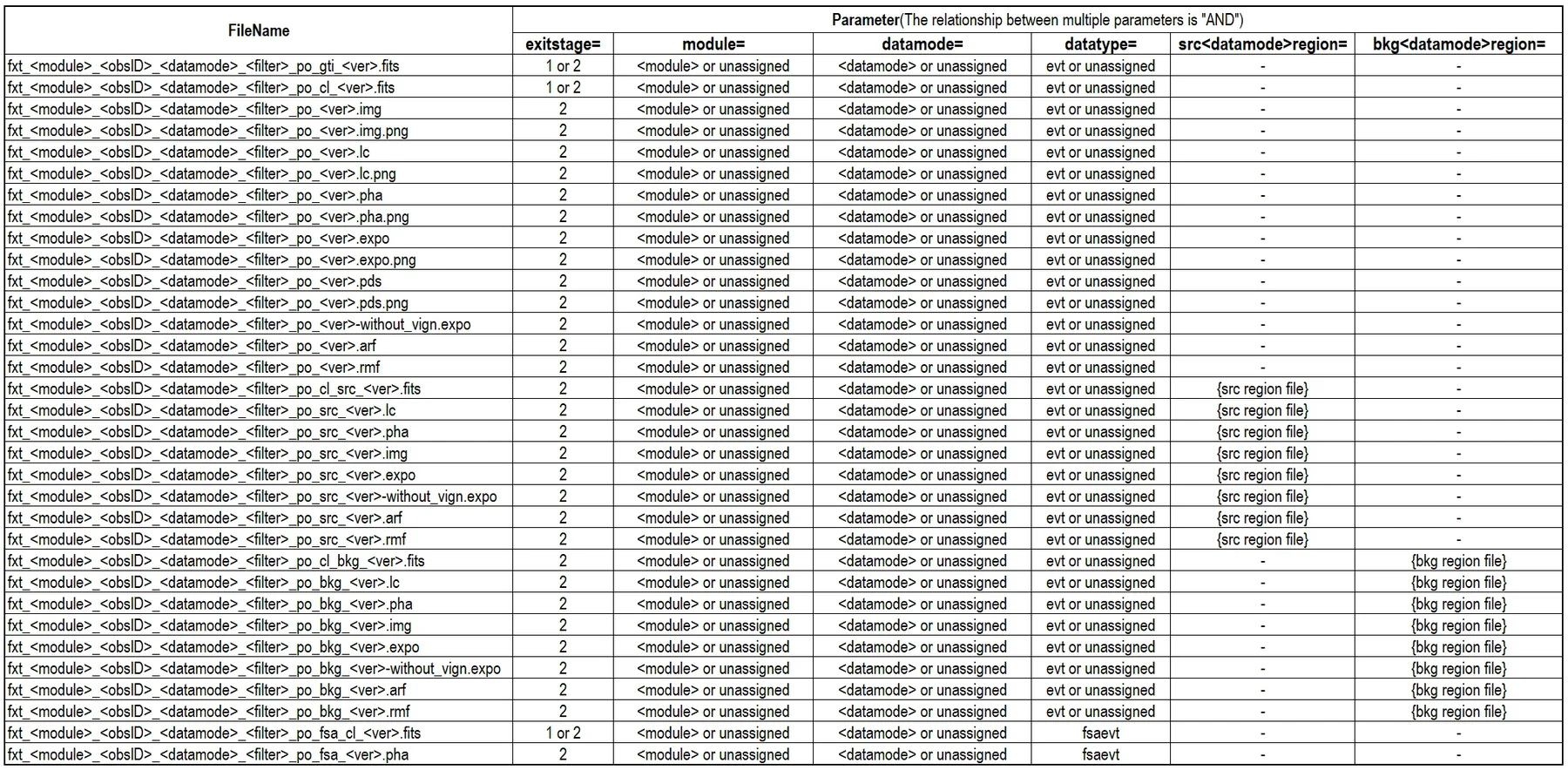
Figure 3: Mapping between fxtchaininput parameters and output files. - exitstage [int]
Use 1 (default) for the cleaned-event stage or 2 for the higher-level products. The FSAEVT limitations of stage 2 are described above. - module [string]
Process only moduleaorb; omit the parameter to process both modules. - datamode [string]
Filter the event files by mode, case-insensitively. UseFF,PW, orTMfor routine science data;DF,DT,SV, andDSare also available for matching auxiliary files. Separate multiple values with commas, for exampledatamode=FF,PW. - datatype [string]
Selectevt(the default),fsaevt, or both asdatatype=evt,fsaevt. - binsize [float]
Light-curve bin size in seconds; the default is 1.0. - ra [float]
Right ascension in degrees for TM/DT time correction. Supply it together withdec; otherwise the pair is ignored. - dec [float]
Declination in degrees for TM/DT time correction. Supply it together withra. - grade [string]
Grade selection, default0-12. A single value, range, upper limit, or lower limit is allowed; separate multiple selections with commas and quote values containing shell metacharacters. - expr[string]
Selection expression for the attitude and instrument housekeeping data.DEFAULTloads the standard expression from CALDB. Quote expressions containing characters such as&or>; for example,expr="ELV>-10". - usergtifile[string]
Input GTI file in FITS format, orNONEto omit a user GTI. - userbpfile[string]
Input user bad-pixel file, orNONEto omit it. - srcffregion[string]
DS9 source-region file for FF data. - srcpwregion[string]
DS9 source-region file for PW data. - srctmregion[string]
DS9 source-region file for TM data. - bkgffregion[string]
DS9 background-region file for FF data. - bkgpwregion[string]
DS9 background-region file for PW data. - bkgtmregion[string]
DS9 background-region file for TM data. - outputlist[string]
Writeoutput.txtfor ordinary EVT processing when set toyesorY; the default isN. - savetmp[string]
Retain temporary files for inspection when set toyesorY. The default isN.
Usage
In these examples, ./observation contains the input observation and ./regions contains the DS9 region files. Set outdir to the directory where you want to write the products.
- Run the standard cleaned-event stage:
fxtchain indir=./observation \ outdir=./fxt-products \ exitstage=1 \ expr=DEFAULT - For TM data, pass the target coordinates together:
fxtchain indir=./observation \ outdir=./fxt-products \ exitstage=1 \ expr=DEFAULT \ datamode=TM ra=161.265 dec=-59.685 - Generate ordinary EVT stage-2 products:
fxtchain indir=./observation \ outdir=./fxt-products \ exitstage=2 \ expr=DEFAULT datatype=evt - Process one module and more than one science mode:
fxtchain indir=./observation \ outdir=./fxt-products \ exitstage=2 \ expr=DEFAULT module=a datamode=FF,PW - Process FSAEVT input for the particle-background spectrum:
fxtchain indir=./observation \ outdir=./fxt-products \ exitstage=2 \ expr=DEFAULT datatype=fsaevt - Extract FF source and background products with DS9 regions:
The analogous PW and TM parameters arefxtchain indir=./observation \ outdir=./fxt-products \ exitstage=2 \ expr=DEFAULT datamode=FF \ srcffregion=./regions/source_ff.reg \ bkgffregion=./regions/background_ff.regsrcpwregion/bkgpwregionandsrctmregion/bkgtmregion.
Run fxtchain without arguments to enter interactive mode; it prompts for indir, outdir, exitstage, and expr. Use fxtchain -h for the installed parameter help and fxtchain -V for the version.